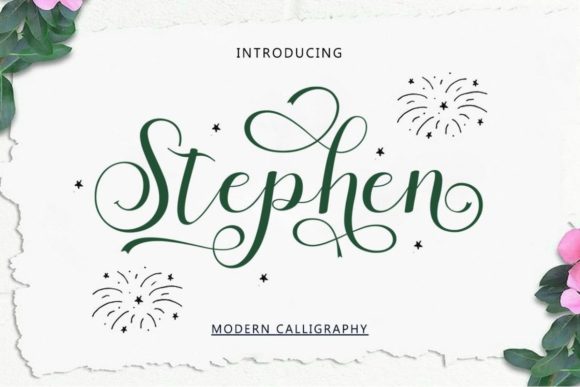
Stephen: The Script Font That Brings Grace to Your Brand
In the world of visual design, the difference between a project that feels "homemade" and one that feels "professionally curated" often comes down to the details. While high-resolution images and a strong color palette are essential, the typography you choose is the voice of your design. If you are looking for a typeface that speaks with sophistication, elegance, and a modern flair, Stephen might be the missing piece in your creative toolkit. It is a beautiful and refined script font designed to bridge the gap between classic calligraphy and contemporary design needs.
At first glance, Stephen impresses with its fluid motion and balanced weight. It avoids the common pitfalls of many script fonts, which can sometimes feel too scratchy, too childish, or illegible at smaller sizes. Instead, Stephen offers a polished, high-end aesthetic. The letterforms connect smoothly, mimicking the natural flow of hand-lettering while maintaining the consistency required for digital and print media. It possesses a "classy" personality—think of the elegance found in luxury branding or the warmth found in a hand-written personal note. This makes it a versatile premium font suitable for a wide range of applications, from corporate branding to intimate wedding stationery.
Understanding the Visual Personality of Stephen
To use a font effectively, you must understand its visual characteristics. Stephen is a script font, which means it is based on the fluidity of handwriting. However, it leans more toward a formal, polished style rather than a rough, casual scrawl. The x-height is generous enough to ensure readability, while the ascenders and descenders (the parts of letters that go up, like 'h', or down, like 'g') are crafted with graceful swashes that add movement to the text.
The charm of Stephen lies in its versatility. It acts as a perfect display font, meaning it shines brightest when used for headlines, logos, and large text blocks where its intricate details can be appreciated. When you look at the curves of the "S" or the tail of the "n," you see a rhythm that guides the eye across the page. This rhythm is crucial for brand identity, as it helps create a mood. Stephen sets a mood of trust, elegance, and attention to detail. It doesn't scream for attention; rather, it invites the viewer in with a confident whisper.
Furthermore, the technical execution of this creative font is noteworthy. Being PUA encoded, Stephen ensures that you have full access to every glyph and swash available. For the non-designer, this simply means that the "extras" aren't locked away behind complex software menus. Whether you are using a professional suite like Adobe Illustrator or a user-friendly platform like Canva, you can access the alternate characters that give the font its unique flair.
Where Stephen Truly Shines: Real-World Applications
Theory is nice, but practical application is what matters. Where does Stephen fit into your workflow? The answer is surprisingly broad, provided you match the font to the right context.
Branding and Logo Design
For entrepreneurs and small business owners, your logo is your handshake. If your brand personality is luxe, boutique, feminine, or artisanal, Stephen is an excellent candidate for your wordmark or logo design. It works particularly well for businesses in the beauty, fashion, photography, or lifestyle sectors. Pairing the flowing nature of Stephen with a clean sans serif font for your sub-headings creates a classic, timeless look that signals professionalism.
The Wedding and Event Industry
There is a reason script fonts are the go-to for wedding designs. They evoke romance and formality. Stephen is ideal for save-the-dates, invitations, menus, and place cards. Its legibility ensures that guests can easily read the details, while its elegance maintains the upscale feel of the event. Because it is a modern typography choice, it avoids looking dated, ensuring your wedding stationery feels fresh and current.
Digital Marketing and Social Media
In the fast-paced world of social media, stopping the scroll is the goal. Stephen works beautifully for Instagram quotes, Pinterest graphics, and Facebook headers. The font adds a layer of personality to flat digital screens. When creating social media graphics, use Stephen for the "hero" text—the main message you want to convey—and back it up with a legible serif font or sans serif font for the smaller details. This contrast creates visual hierarchy, ensuring your message is both seen and understood.
Publishing and Editorial Design
For bloggers and publishers, Stephen is a fantastic asset for editorial design. It works well for pull quotes, chapter titles, or blog post headers. It breaks up the monotony of long-form body text (which should rarely be set in a script font) and adds a touch of human warmth to digital articles or printed books.
Strategic Typography: Influence on Perception and Engagement
Typography is not just about aesthetics; it is a strategic tool that influences how your audience perceives your message. The font you choose can dictate the tone of your content before a single word is read.
When you use a font like Stephen, you are signaling a specific set of values. The fluidity and care required to produce such a typeface suggest that the brand or individual using it also values care and quality. This contributes to brand perception. A law firm might find Stephen too casual for their main briefs, but a high-end bakery would find it perfect for packaging design. The font becomes part of the product experience.
Visual hierarchy is another critical area where Stephen excels. In any layout, you need to tell the viewer what to look at first, second, and third. By using Stephen for your primary headlines, you instantly create a focal point. The eye is naturally drawn to the complex, decorative nature of the script. You can then use a simpler typeface for the body copy to ensure readability. This interplay between a decorative display font and a functional body font is the cornerstone of effective modern typography.
Practical Guide: Testing and Pairing Stephen
Adopting a new design asset requires a bit of strategy. Here is a practical approach to integrating Stephen into your projects.
- Evaluate the Fit: Before committing, ask yourself if the personality of Stephen matches the personality of your project. If you are designing a "Back to School" sale flyer for a hardware store, a heavy slab serif might be better. If you are designing a menu for a French patisserie, Stephen is likely the perfect fit.
- Master the Font Pairing: A script font rarely works well on its own for long text. You need a companion. A classic strategy is to pair Stephen with a geometric sans serif font (like Montserrat or Raleway). The clean, straight lines of the sans serif complement the curves of Stephen, creating a balanced and harmonious layout. Alternatively, pairing it with a delicate serif font can create a vintage or romantic vibe.
- Check the Weights: Does the font family come with different styles? A bold version of a script can be tricky, but if available, it can add emphasis. Check if Stephen includes a regular and a bold or swash-heavy version to give you more creative control.
- Readability is King: Always test your text at the size it will be viewed. Stephen is a display font, so it is meant for large sizes. If you try to set a paragraph of 10pt text in Stephen, it will likely become a blur of ink. Keep it for headlines, logos, and large accents.
- Licensing for Commercial Use: If you are using this for a client project or selling products (like T-shirts or mugs) with the font on them, ensure you have the correct commercial font license. Most premium fonts distinguish between personal and commercial use.
Accessing the Full Potential of the Font
One of the standout features mentioned regarding Stephen is its PUA (Private Use Areas) encoding. In practical terms, this is a massive benefit for users of all skill levels. Often, fonts come with beautiful alternate characters—perhaps a lowercase "t" without the crossbar, or a capital "M" with extra loops—but accessing them requires knowing specific keystroke combinations or navigating complex glyph panels.
Because Stephen is PUA encoded, these special characters are accessible as standard keyboard characters in many programs. This empowers content creators and crafters to customize their text without needing advanced design training. You can easily swap out a standard letter for a swash version to make your logo or invitation feel truly bespoke. This ease of use makes Stephen a highly user-friendly creative font for the hobbyist and the professional alike.
Conclusion
Stephen is more than just a collection of curves and lines; it is a versatile tool for visual communication. Whether you are refining a brand identity, crafting a wedding invitation, or designing a social media campaign, this script font offers the perfect blend of elegance and modernity. By understanding its personality and pairing it wisely with complementary typefaces, you can elevate your projects from simple layouts to sophisticated designs that resonate with your audience. It proves that sometimes, the most powerful way to communicate is with a touch of grace.